Signing up creates two things at once: your user account and your organization. The organization is where your team, your settings and all your CRM records live. You become its Owner, the one person who can do everything in it.
Sign up
- Go to app.invrsys.com/register. You see the Create an account form.
- In Organization name, type your company or team name. You can change it later.
- In Email, type the address you want to sign in with. Use one you can open now, because Vivre sends a code to it.
- In Password, type a password. The list under the box ticks off each rule as you meet it: at least 8 characters, one capital letter and one number.
- Type the same password again in Confirm password.
- If a friend who uses Vivre gave you a code, type it in Referral code. This is optional, so leave it empty if you have none.
- Tick I agree to the terms and privacy policy.
- Click Sign up. Vivre creates your account and asks for the code it just emailed you.
[[shot:signup-form | The "Create an account" form filled in for Acme Realty, with the Sign up button outlined]]
Next, enter that code: see Verify your email.
Add your name
The sign-up form doesn't ask for your name. Add it straight away, so your team can see who owns which records.
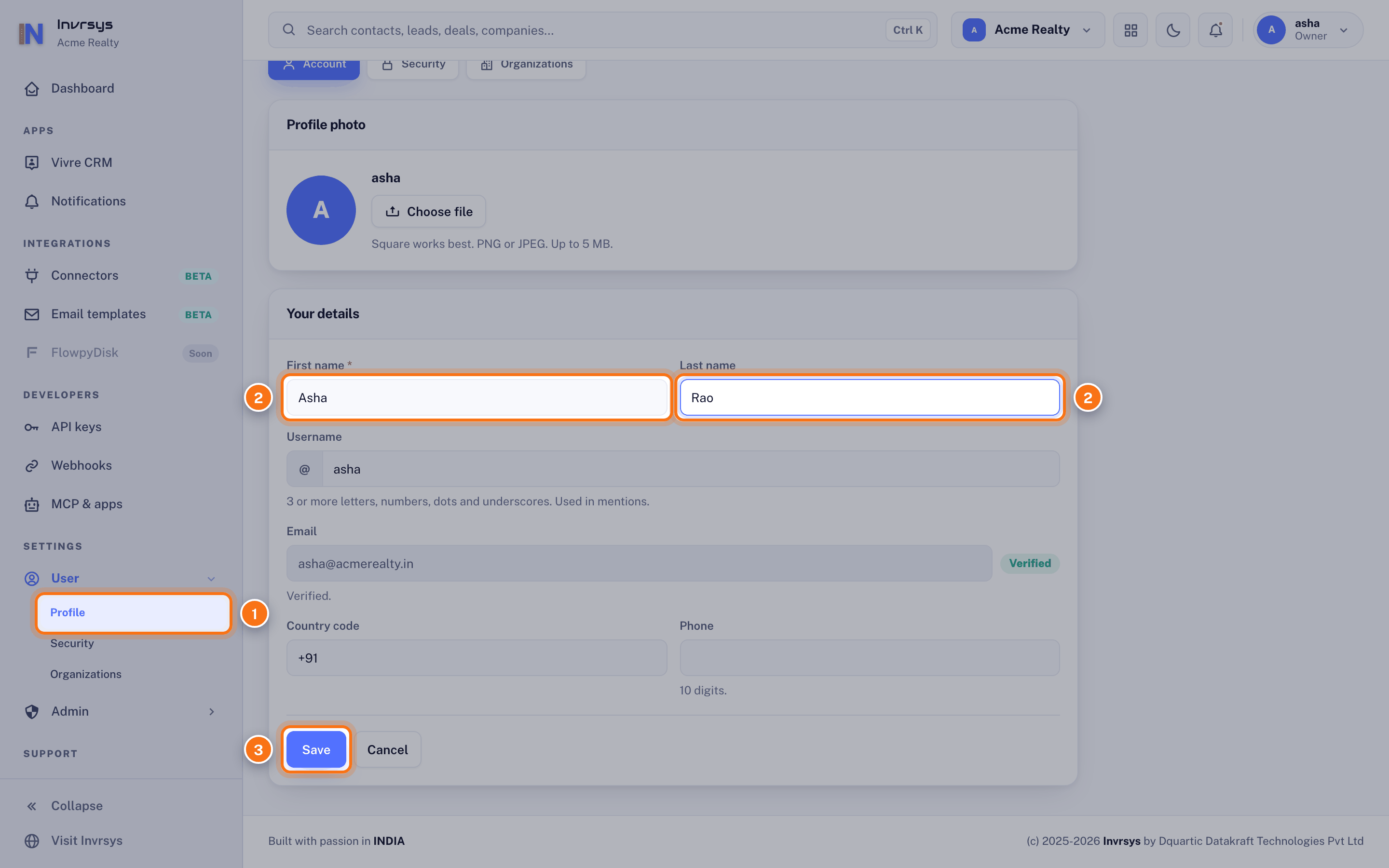
- Once your email is verified, Vivre opens your Account page. If you're somewhere else, go to Settings › User › Profile in the left sidebar.
- Under Your details, type your First name and Last name.
- Click Save. Your name now shows in the top right corner and on everything you create.